欧美极品高清xxxxhd,国产日产欧美最新,无码AV国产东京热AV无码,国产精品人与动性XXX,国产传媒亚洲综合一区二区,四库影院永久国产精品,毛片免费免费高清视频,福利所导航夜趣136

標題: VMware Workstation中安裝XP系統一點心得 [打印本頁]

作者: bibi    時間: 2015-4-18 21:41
標題: VMware Workstation中安裝XP系統一點心得
       大概半個月前,我就從網上down了個漢化版的VMware Workstation 5.0,,打算裝個Windows Server 2003,從同學處借來光盤后,安裝過程中出了一些問題,我也沒多想就沒裝了,直接裝到了電腦上的E盤,我的電腦就成了雙系統了,,記得那時這個win 2003不能驅動我的網卡,我為了驅動它可費了我的一番心血啊,那是笨啦!我的主板是華碩的,P5GC-MX/1333,不知道去生產商的網站去下,總算找了半天在個不知名的小網站找到了~~現在總結了一點,那就是Windows Server 2003面向服務器的,它里面只集成了一些高性能的網卡的驅動程序,我的垃圾網卡就驅動不了,還有聲卡沒驅動,也挺費勁了找到了一個萬能聲卡驅動,AUD_ALLOS_XP_VISTA_5377_PV_REALTEK.EXE,閑話就不多說了,今天我又下了個深度Windows XP SP3 完美精簡 v6.2 正式版來裝,結果中途有來問題了,彈出個框框,我把它截圖了
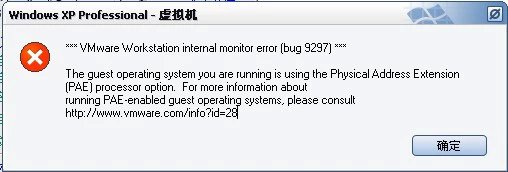


還好我能看懂點英文,我按照它提示的一個網址www.vmware.com/info?id=28找到了答案,

Details
While I was trying to install a guest operating system, or upgrade an existing legacy virtual machine, my VMware product displayed a message that said the guest operating system was trying to use PAE. How can I correct the problem?

Solution
Below are two situations in which this error message appears:
To resolve the issue:
You can then power on the virtual machine and run a PAE enabled guest operating system in it.
For more information about editing the virtual machine's configuration file, see http://kb.vmware.com/kb/1714.
Note: If you run the Microsoft Application Compatibility Toolkit on a Windows XP Service Pack 1 system that has VMware Workstation 5 installed, the Application Compatibility Toolkit identifies Workstation as a program that has problems on Windows XP Service Pack 2. It identifies Workstation because of the issue described in this article. The workarounds described in this article resolve the issue.

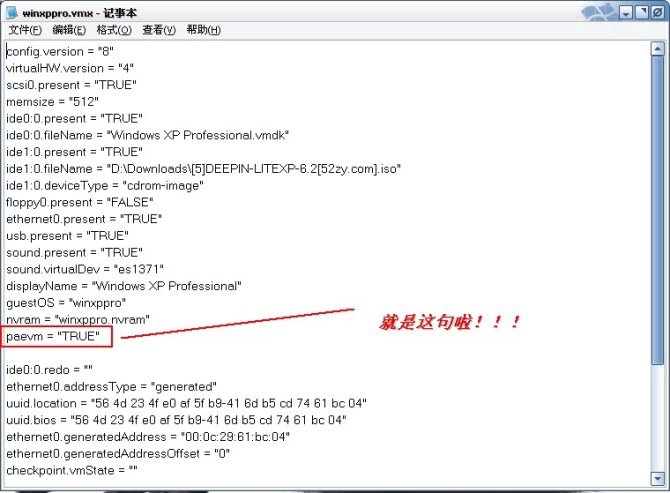
呵呵~我的問題很簡單,用搜索搜到我的winxppro.vmx,用記事本打開,在里面添上一句paevm = "TRUE",重啟OKay!!!!!!!!!!


歡迎光臨 (http://www.raoushi.com/bbs/) Powered by Discuz! X3.1